💭 Second Thought
Build wealth by thinking twice before you buy
The Problem
Americans spend about $5,400 per year on impulse purchases, according to national consumer surveys. E-commerce platforms use sophisticated psychological tactics—fake urgency, manipulative discounts, and frictionless checkout—to exploit our cognitive biases.
Source: Slickdeals / OnePoll consumer survey (reported by CNBC).
Our Solution
Second Thought is an AI-powered browser extension that intervenes at the moment of highest risk: the checkout button. Using Google Gemini 3, it analyzes purchases in real-time, calculates opportunity costs, detects predatory pricing, and enforces 24-hour cool-down periods.
AI-Powered Analysis
Google Gemini 3 analyzes purchase necessity based on your financial goals, providing personalized, empathetic guidance in near real-time.
Opportunity Cost Calculator
See what your money could become if invested. That $300 smartwatch? It's $1,161 in 20 years at 7% growth.
Predatory Pricing Detection
Exposes fake discounts, urgency manipulation, and psychological tricks retailers use to pressure you into buying.
24-Hour Cool-Down
Enforces a waiting period for non-essential purchases. Behavioral research suggests cooling-off delays (e.g., 24–48 hours) reduce impulsive buys by giving time for reflection.
Personalized Insights
Tailored to your financial goals—saving for a house, paying off debt, or building an emergency fund.
Full Observability
Integrated with Opik for comprehensive tracing, LLM-as-judge evaluations, and quality monitoring.
📦 Installation Guide
Step 1: Download the Extension
Clone or download the repository from GitHub:
git clone https://github.com/todorakai/second-thought-gemini
cd second-thought-gemini
Or download as ZIP and extract it.
Step 2: Open Chrome Extensions
In Google Chrome, navigate to:
chrome://extensions/
Or click the three dots menu → Extensions → Manage Extensions
Step 3: Enable Developer Mode
Toggle the "Developer mode" switch in the top right corner.
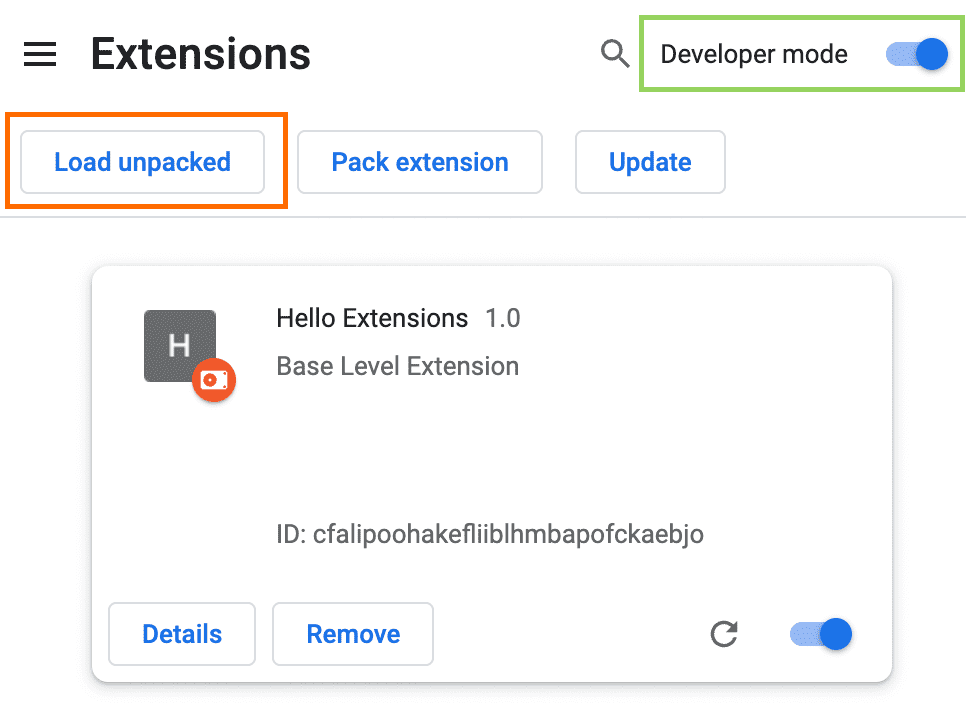
Step 4: Load the Extension
- Click the "Load unpacked" button
- Navigate to the downloaded folder
- Select the "extension" folder inside the project
- Click "Select Folder"
⚠️ Important: Make sure to select the extension folder, not the root project folder!
Step 5: Verify Installation
You should see the Second Thought extension card appear with:
- 💭 Second Thought icon
- Version 1.0.0
- Status: Enabled
The extension icon should also appear in your Chrome toolbar (top right).
✅ You're All Set!
Now visit any e-commerce site (Amazon, eBay, Walmart, etc.) and browse a product over $20. Second Thought will automatically intervene with AI-powered insights!
Try it now: Visit Amazon.com and click on any product.
🎯 Quick Test
Test the Extension:
- Visit Amazon.com
- Search for any product (e.g., "smartwatch", "headphones")
- Click on a product that costs more than $20
- Wait 2-3 seconds
- The Second Thought panel will slide in from the right! 🎉
⚙️ Configuration (Optional)
Click the Second Thought icon in your toolbar to customize settings:
Spending Threshold
Set the minimum price for intervention (default: $20)
Financial Goals
Add your goals: "Save for house", "Pay off debt", etc.
Monthly Budget
Set your budget for personalized insights
❓ Troubleshooting
Extension doesn't appear?
- Make sure the product costs more than $20
- Reload the extension in
chrome://extensions/ - Refresh the product page
- Check browser console (F12) for errors
Extension not loading?
- Verify you selected the
extensionfolder, not the root folder - Make sure Developer mode is enabled
- Try removing and re-adding the extension
Need more help?
Check the full documentation on GitHub or open an issue.
🛠️ Tech Stack
How It Works
- Detect - Extension identifies product pages on major e-commerce sites
- Extract - Captures product details, price, and urgency indicators
- Analyze - Gemini 3 evaluates necessity vs. impulse in <500ms (typical benchmark)
- Calculate - Shows opportunity cost (5, 10, 20-year projections)
- Warn - Detects predatory pricing tactics and manipulation
- Intervene - Displays intervention panel with personalized guidance
- Protect - Enforces 24-hour cool-down for non-essential purchases
Gemini 3 Integration
Second Thought leverages Gemini 3's enhanced reasoning capabilities to understand nuanced financial contexts, detect subtle manipulation tactics, and generate empathetic, personalized guidance.
The model's low-latency benchmarks make near real-time intervention possible without disrupting the shopping experience. Gemini 3 is central to every feature—from analyzing purchase necessity to generating supportive messages that users actually listen to.